
EM Hosting/Cloud Login
The credentials for the Hosting environment will always be "Firstname.Lastname@em-hosting.com"
e.g. John.smith@em-hosting.com
Commonly referred to as Parallels. Cloud users can conveniently log in to access ManuMax EM from any internet-connected device using either a web browser or by downloading the desktop client.
Web Client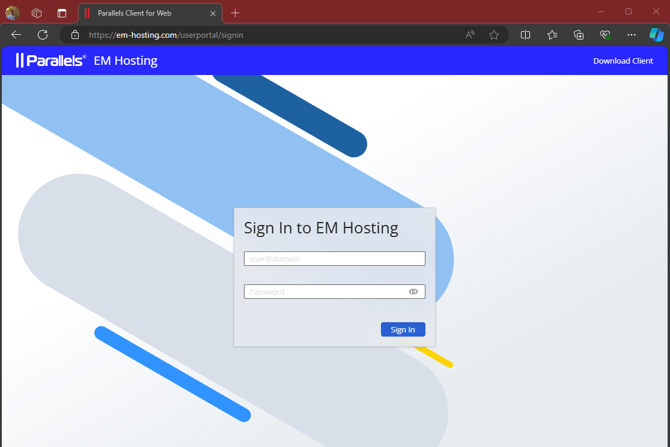
Desktop Client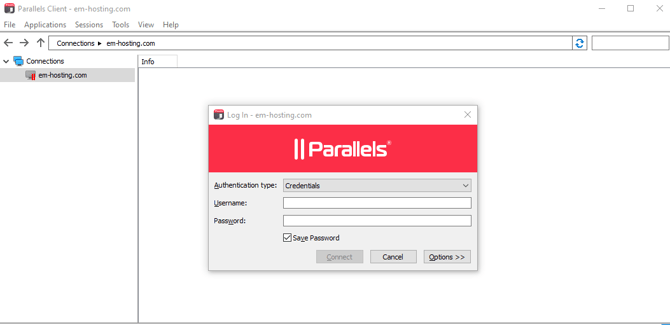
If you need your Parallels password reset please click here
ManuMax EM Login
Previously, ManuMax EM accounts were created using a simple username and password.
To enhance the security of user and customer information, ManuMax EM, Work Request Online, and ManuMax Mobile will now require logging in using ManuMax Security credentials.
ManuMax Security credentials will consist of the user's email address and a password created by the user. These credentials can be used to log in to ManuMax EM, the mobile app, and Work Request Online.
e.g.
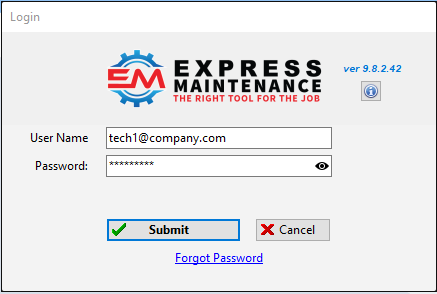
Read below on how to set this up.
ManuMax Security Credentials
The USERNAME credentials will consist of the ManuMax EM email used in the green box below. These credentials usually come when an admin creates a user but may have been manually entered.
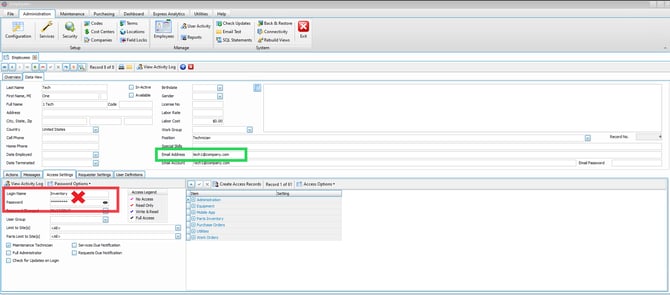
If the email address is a valid email address, and the user has set up their password, they may be able to login to ManuMax EM with those credentials.
If you have set up your credentials before and forgot your password, follow this guide.
*Users who do not know these credentials, please reach out to your Admin or to ManuMax Support immediately.
Admins can refer to this guide for further assistance on adding users.
Please note, the old login credentials will no longer function. Only the user's email and password will work if they are 'Active' in ManuMax Security.
If you are still experiencing issues logging in or require help getting set up in ManuMax Security please don't hesitate to reach out for support.